 Christmas Pet Cards
Make and send one from our apps
These screens are from Christmas Dog Cards. Christmas Cat Cards works the same way.
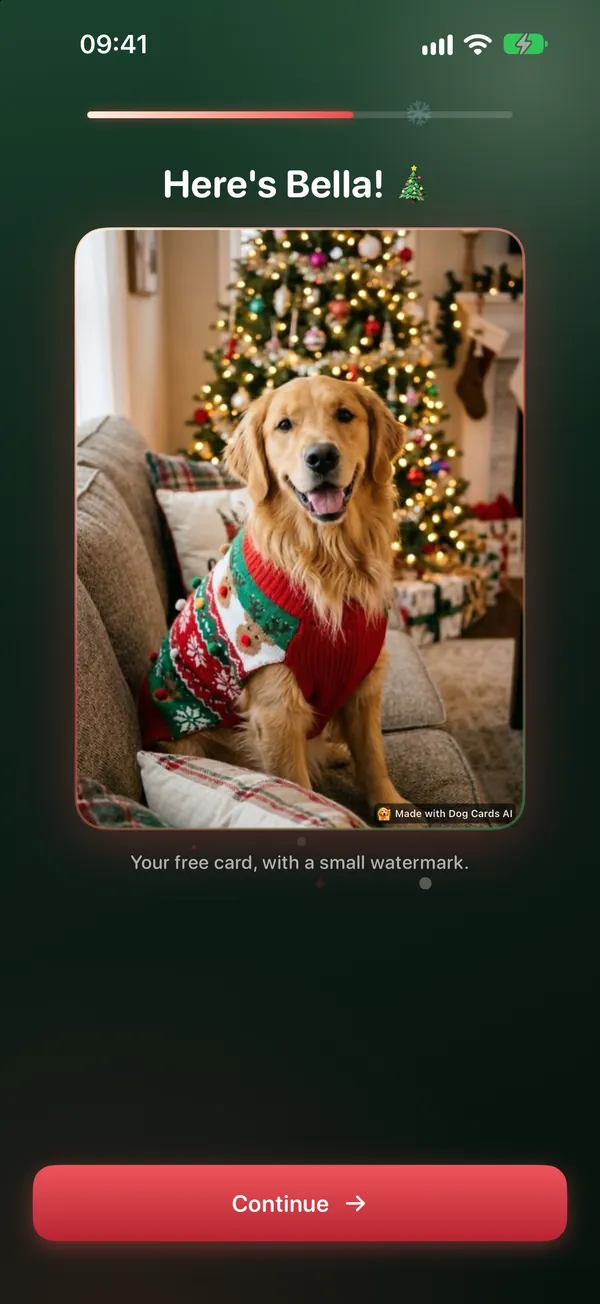
Make the card
Add a photo of your dog or cat and choose a look. The card usually takes 10 to 30 seconds, and the free one has a small watermark in the corner.
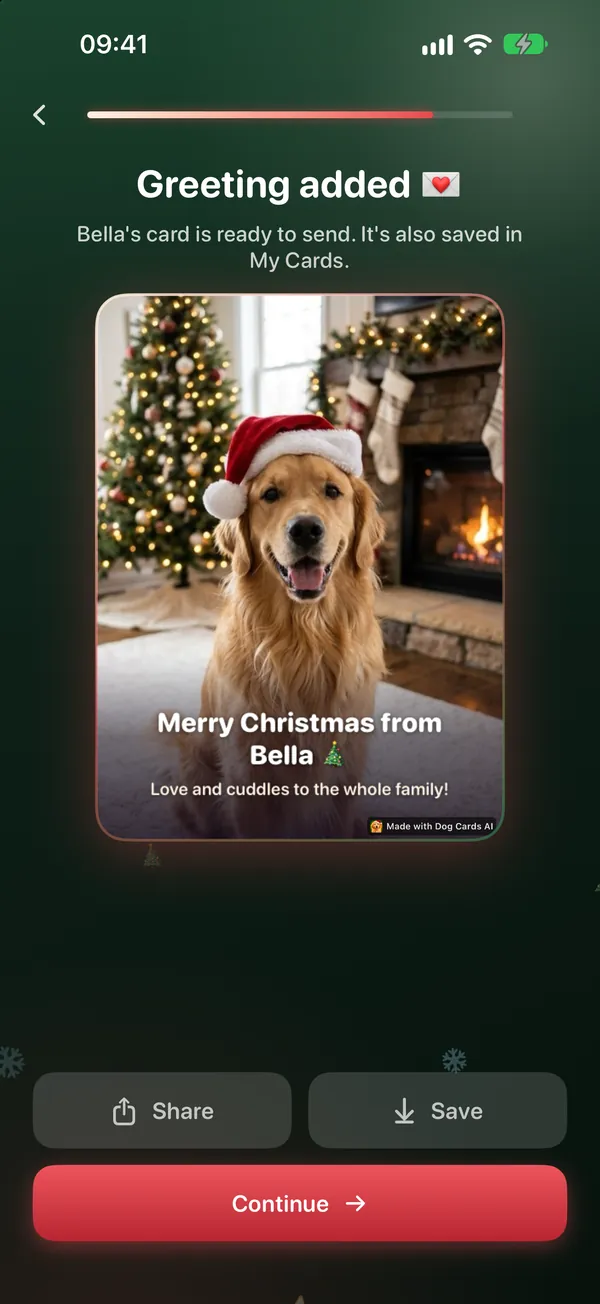
Tap Share
The iPhone share sheet opens. Choose Messages or WhatsApp, pick the person, write your line and send.
The greeting on the first card is fixed: “Merry Christmas from” and your pet’s name, with a second line that depends on who gets it. Later cards are the picture alone. Either way your own words go in the message. Tap Save instead of Share if you want the card in Photos, and find every card again under My Cards. The app can also make a PDF, a US Letter page with a small “Made with” line, on paid cards too.
Send any card with iPhone Messages
- Open the conversation in Messages.
- Tap the plus button, tap Photos and choose the card.
- Type your message under the picture and tap the send arrow.
You can also start in Photos: open the card, tap the share button and choose Messages. To send it on to the next person, tap the picture in the chat, tap the share button and pick a contact.
Send it on WhatsApp
- Open the chat, tap the plus button and then Photos, and select the card.
- Tap the HD button, choose HD quality, and add your message as the caption.
- Tap send.
To make HD the default, tap your profile picture or Settings, then Storage and data, then Media upload quality. WhatsApp says media files are usually compressed when shared, and that you cannot upgrade a photo you already sent, so set this before the first card goes out. HD does not promise the original file: WhatsApp notes that your internet connection affects the quality even then.
What happens to the picture quality
| How it travels | Who gets it | What the source says about pictures |
|---|---|---|
| iMessage, blue bubble | Apple devices | High resolution photos |
| RCS, green bubble | Android and iPhone, if the carrier supports it | High resolution photos |
| MMS, green bubble | Other phones, if the plan and carrier support MMS | Photos, with no word about resolution |
| SMS, green bubble | Any phone that gets texts | Text only, it cannot carry the card |
| Anyone with WhatsApp | Usually compressed; HD is clearer, with no promise of original quality |
If your pictures arrive small, look in Settings, Apps, Messages for Send Low Quality Photo Previews. It sends a small version first, and when Low Data Mode is on only the small version goes out.
For somebody who wants to print the card, send the original file by AirDrop or email. Pictures taken from text messages lose resolution, according to the photo lab Mpix. The card size checker shows what a file is good for.
What friends on Android get
They get a picture, the same as any photo you text them, with nothing to install. Our apps run on iPhone only, so a friend on Android cannot make a card in them, but can open, save and forward yours.
One group text or separate messages?
In a group iMessage or a group MMS everybody sees every answer, so thirty relatives will see thirty thank-yous. A group SMS cannot carry a picture at all. Use the family group for the family, and send the card one by one to people who do not know each other. It takes a minute more, and you can put a name in each message.
When to send it, and how to schedule it
There is no mailing deadline, so anywhere from the second week of December to Christmas morning works. Mind the time zone before you send something at six in the morning.
On an iPhone you can write it now and send it on the day. In Messages, tap the plus button, then Send Later, up to 14 days ahead. You need iMessage turned on, the other person can use any device, and the message goes out even if your phone is offline.
What to write with it
- This year’s card fits in your phone. Merry Christmas, and come see us in January.
- Merry Christmas from all of us, and from Bella, who chose the photo.
- Bella tried to send this herself and called you twice. Merry Christmas!
- Thinking of you today. No need to answer, the cat just wanted to say hi.
There are many more on the pages for messages from the dog and messages from the cat, each with a message maker.
Make a card to text
One photo of your pet becomes a Christmas card you can share from your iPhone. The first card is free with a small watermark. After that a card costs 25 Treats, and a one-time pack is $5.99 for 7 cards or $12.99 for 16 (US App Store, read November 24, 2026).



For iPhone, iOS 18.6 or later. On a computer, scan the code with your iPhone camera.
Questions about sending a card by text
Can I send a Christmas card by text for free?
Yes, if you have the picture and your phone plan includes picture messages. iMessage and WhatsApp use Wi-Fi or mobile data. In our apps the first card is free with a small watermark.
Does the other person need an iPhone or an app?
No. The card is a picture, so any phone that can receive photos can open it. Plain SMS carries text only, so a green-bubble card needs RCS or MMS. For WhatsApp you both need WhatsApp.
How do I send a digital Christmas card to many people?
Send it to each person from the share sheet, or forward the picture from one chat to the next contact. A group text is faster, but in a group iMessage or group MMS everybody sees all the answers.
Can I schedule a Christmas text on iPhone?
Yes. In Messages tap the plus button and Send Later, up to 14 days ahead. You need iMessage turned on, and the person who gets it can use any device.
Can I type my own greeting on the card?
Not on cards from our apps. The first card has a fixed greeting with your pet’s name, and later cards have no text. Put your own words in the message.
Will the picture lose quality?
It can. Apple lists high resolution photos for iMessage and RCS, and says nothing about resolution for MMS. WhatsApp usually compresses pictures, and HD quality does not promise the original. Send the original file if somebody wants to print it.
More for your card
- What to write in a Christmas card from your dog
Lines for family, friends and the sitter, and a message maker.
- Cat Christmas card messages
Lines from the cat for family, the sitter and the vet team.
- Pet Christmas card ideas
Ideas for a card with your dog or cat on it.
- Christmas card sizes
Check whether your photo has enough pixels for the paper.